
Looking for a TablePlus alternative? Most people searching that phrase are not hunting a prettier SQL editor. They hit a free-tier wall (tabs / connections), a per-device license, or the “one client per database” tax. This guide compares options by multi-database reach, weight (installer vs RAM — keep them separate), and where AI actually helps.
Why people leave TablePlus
TablePlus earned its reputation as a clean, fast SQL client. The search traffic around TablePlus alternative usually shows up later — after a constraint, not after a design complaint.
Community threads in the last month keep repeating the same exits:
- Free tier friction — limited tabs or connections on the free plan; paid unlocks often sit around ~$99 per device. A desk with a work laptop plus a personal machine (or a second OS) multiplies cost quickly.
- One cockpit or many — people still bounce between a SQL GUI, a Redis tool, a document browser, and an SSH jumphost. LibreDB-style complaints on Reddit put it bluntly: dbeaver + compass + redis gui + ssh… none of that fits on a locked work laptop.
- Weight anxiety — “lightweight” is overused. Some want out of Electron or JVM stacks; others just want fewer installs on a locked corporate laptop where every
.msineeds a ticket. - AI curiosity without autopilot — teams want SQL draft / explain help, but they do not want a model with production credentials and no human gate.
If that is you, skip beauty contests. Score tools on three axes: what engines live in one window, installer size vs steady RSS, and whether AI drafts SQL without becoming an unsupervised autopilot.
What “good enough” means in 2026
A modern database client should at least:
- Keep multiple engines (SQL, cache, queue, search, vector) reachable without swapping apps.
- Publish honest weight numbers — installer megabytes are not RAM; UI stack is a third axis.
- Treat AI as a copilot: draft and explain, while humans still own schema checks, result review, EXPLAIN, and production gates.
- Survive locked laptops — fewer companion apps, optional agents instead of “install five more GUIs.”
GoNavi is built around that split: Wails (Go + system WebView) desktop, multi-source workbench, optional AI / MCP — secrets stay on the host. It is not a pixel-for-pixel TablePlus clone; evaluate it on the axes above.
Comparison snapshot (decision table)
Use this as a decision table, not a feature bingo card.
| Client | Stack vibe | Multi-DB story | Weight notes | Best when… |
|---|---|---|---|---|
| TablePlus | Native-feeling commercial GUI | Strong on relational; not a universal Redis / Kafka / vector cockpit | Paid unlocks per device; free tier is gated | You live in a few RDBMS and already like its UX |
| DBeaver | Java / Eclipse lineage | Extremely wide JDBC world | Community often calls it heavy (cold start; multi‑GB RSS is a common complaint) | You need obscure drivers and can afford JVM weight |
| Beekeeper Studio | Electron | SQL-focused modern UI | Electron baseline; marketing often cites hundreds-of-MB class | You want a polished OSS SQL client and accept Chromium tax |
| DataGrip | JetBrains IDE | Deep SQL IDE | IDE-class footprint and pricing | You already live in JetBrains |
| GoNavi | Go + system WebView (not Electron) | SQL · cache · vector · MQ · search · time-series · domestic DBs in one workbench | Installer ~20–26 MB (v0.9.8). Linux idle RSS sample: main ≈429 MB, with WebKit helpers ≈765 MB (method below) | You want one cockpit + optional AI without Electron |
Weight honesty (do not mix columns)
| Metric | What it answers | GoNavi example (v0.9.8) |
|---|---|---|
| Installer size | Download / IT ticket friction | Win portable ≈20.5 MB · MSI ≈22.7 MB · macOS Arm64 DMG ≈26.1 MB · Linux ≈21 MB |
| Steady RSS | What sits in RAM after idle | Linux sample: main ≈429 MB; with WebKit helpers ≈765 MB |
| UI stack | Chromium vs system WebView vs JVM | Wails + system WebView (not Electron) |
Method note (GoNavi RSS): one Linux cloud run of the v0.9.8 WebKit41 build — empty workbench, no DB connections, remote display, ~30–40 s steady. That is not installer size, and it is not an unverified “native ~80 MB” claim. Windows / macOS laptop numbers may differ. Always label methodology when you quote RAM.
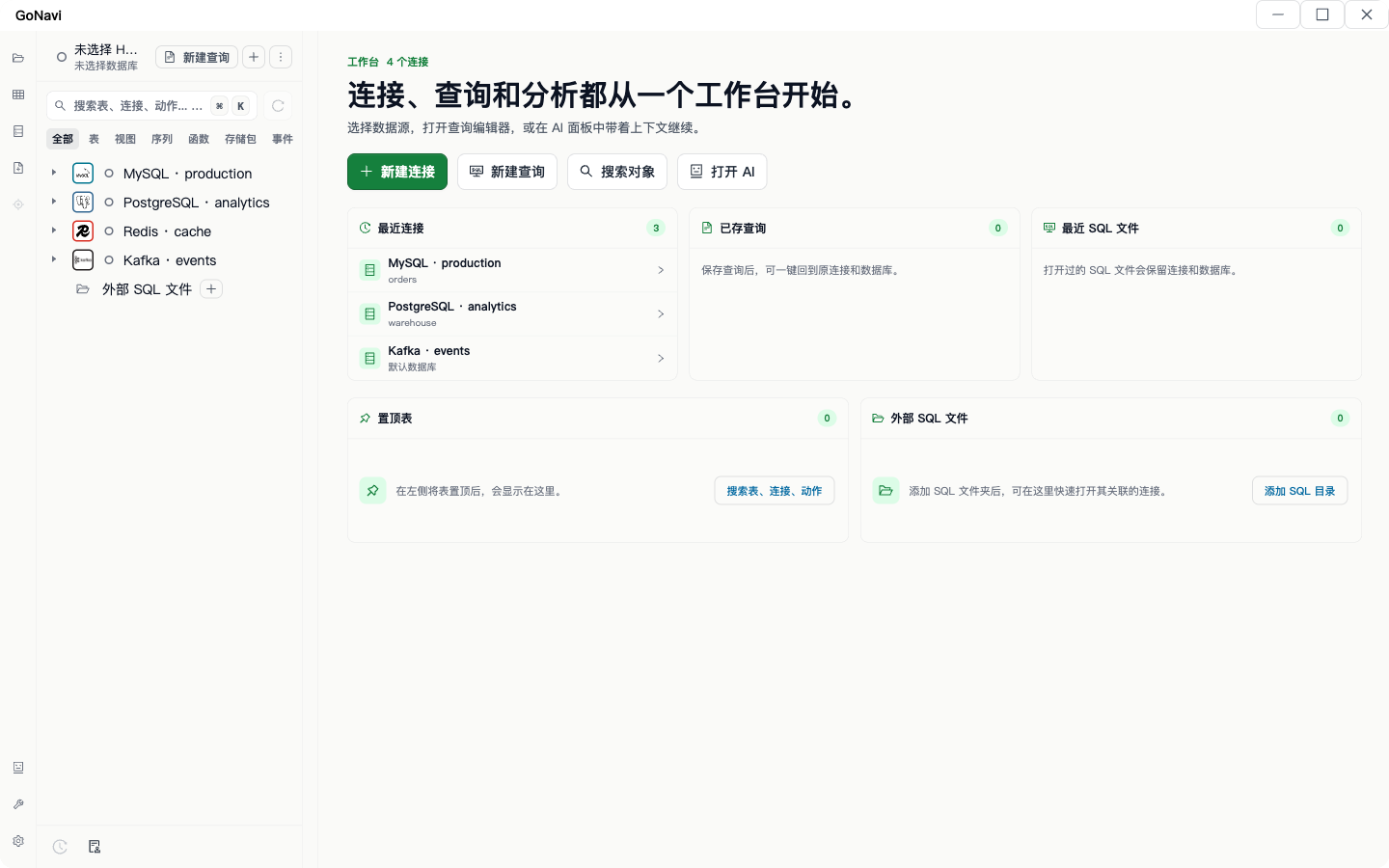
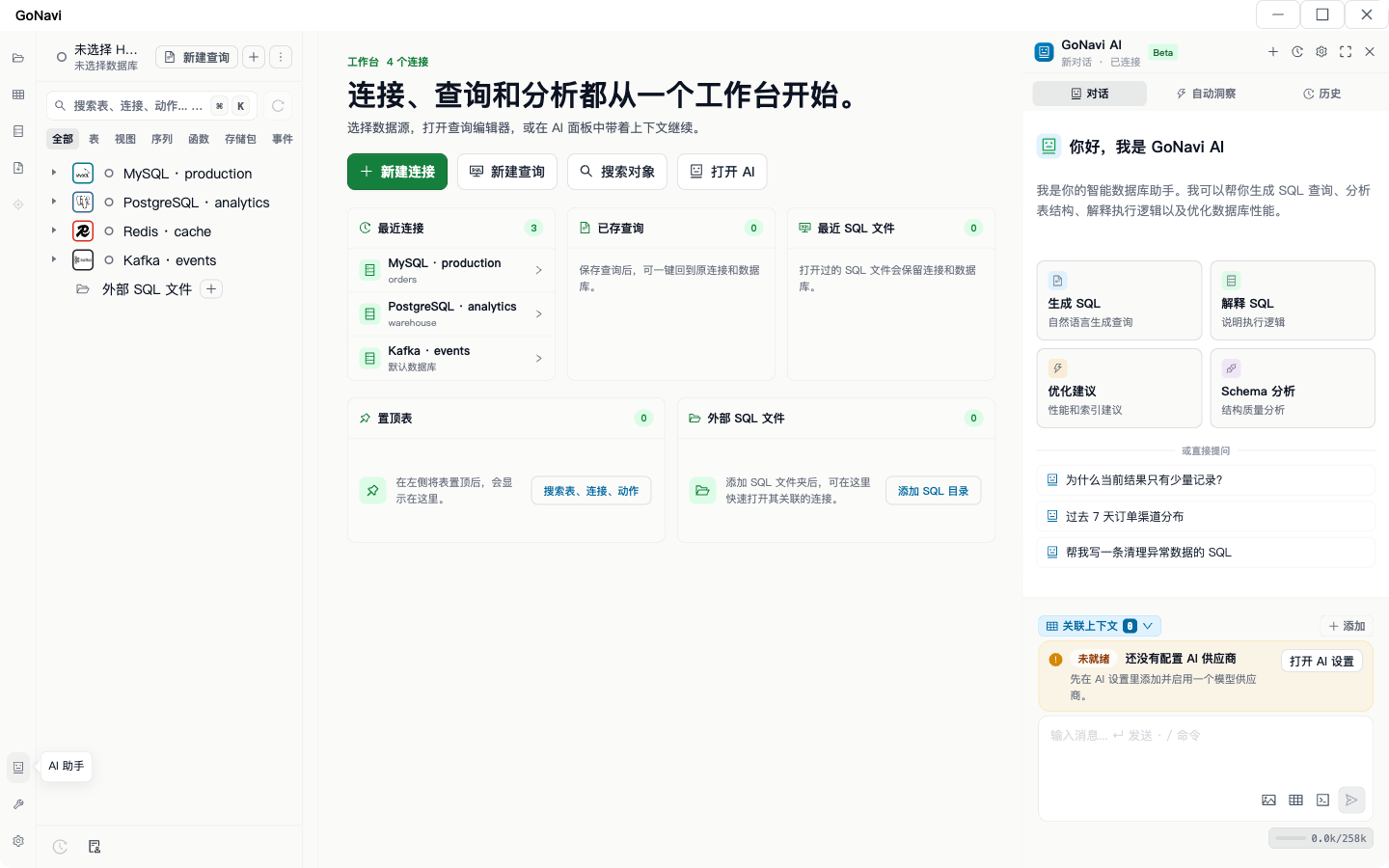
Screens that show the multi-engine story:
- Multi-DB workbench — MySQL / PostgreSQL / Redis / Kafka in one sidebar
- AI panel — generate / explain / optimize entry points (provider may need config; treat the shot as UI evidence, not a configured-provider claim)
Built-in and agent engines (why “one cockpit” matters)
GoNavi’s README lists a large surface: built-in paths for MySQL / GoldenDB / PostgreSQL / Oracle / Redis / Chroma / Qdrant / Milvus / RocketMQ / MQTT / Kafka / RabbitMQ, plus a long optional-agent catalog for more SQL, NoSQL, search, graph, and time-series systems.
You do not need every engine on day one. The point for TablePlus alternative searchers is simpler: stop installing a second Redis GUI and a third Kafka UI just because the SQL client stopped at relational.
Typical “tray of apps” people replace:
- SQL client (TablePlus / DBeaver / Beekeeper)
- Redis GUI
- Document / vector browser
- MQ console
- SSH jumphost habits that never lived in the SQL app
One workbench will not magically replace every specialist tool. It does cut the daily context switches that make locked laptops painful.
When to pick GoNavi
Choose GoNavi if you:
- Need MySQL + Postgres + Redis + Kafka (and more) without a tray full of icons
- Prefer non-Electron packaging and small installers
- Want AI that drafts SQL while you still drive connections, schema, grids, and EXPLAIN
- Care about agents: MCP can expose tools without shipping passwords off-host
- Work across domestic and international engines in one sidebar
Skip GoNavi (for now) if you…
- Only need one commercial RDBMS and already love TablePlus’s UX and license model
- Require a niche JDBC driver that only DBeaver ships today
- Need a fully cloud-only SaaS SQL IDE with zero desktop install
- Want a pure terminal workflow (
psql+ editor) and never open a grid
Honest “not for you” copy converts better than feature inflation — and it matches how people actually decide after a TablePlus free-tier wall.
After AI can write SQL, do you still need a GUI?
Short answer: yes, if you ship anything that can break production.
AI is good at drafting. It is bad at being an unsupervised driver. Recent community framing:
- Hacker News still asks whether management tools matter when models write SQL.
- Validation culture: only believe what you can validate; “efficient but dumb if not monitored.”
- Product norms for safe text-to-SQL: show the SQL, don’t auto-run destructive statements, prefer read-only agents, use EXPLAIN before trust.
So the split is clean:
| Job | AI | GUI / client |
|---|---|---|
| Draft SELECT / ETL sketch | Strong | Optional |
| Attach live schema context | Helpful | Client supplies it |
| Multi-connection cockpit | Weak | Required |
| Edit rows / batch txn | Weak | Required |
| EXPLAIN / plan review | Assist | Human gate |
| Decide “safe to run in prod” | No | Human gate |
GoNavi’s product line matches that split: AI is a copilot in the workbench, not a replacement for the workbench. If your “alternative” search is really “I want ChatGPT to own production,” pause — that is a process problem, not a client skin problem.
Migration checklist (TablePlus → GoNavi)
- Export or note connection hosts, SSH tunnels, SSL settings, and favorite queries from TablePlus.
- Install GoNavi from Releases (~20–26 MB class assets depending on OS).
- Recreate connections; for Redis / Kafka / vector / search, add them in the same workbench instead of a second app.
- Open a query tab, run a known-good
SELECT, confirm encoding / timezone / SSL / SSH behavior. - If you use AI: configure a provider, ask it to draft SQL, read the statement, then run deliberately — never “generate and hope.”
- Pin critical tables / save snippets so day-two friction drops.
- Keep TablePlus around for one week as a fallback; delete the license anxiety only after your daily path is solid.
FAQ
Is GoNavi a free TablePlus clone?
No. Different stack (Wails), broader data-source set, optional MCP / AI. Evaluate on multi-DB and weight honesty, not pixel matching.
Why not just ChatGPT + psql?
CLI plus chat works for one-off queries. It fails the “locked laptop / five engines / visual grid / EXPLAIN habit” test that drove people to search TablePlus alternative in the first place.
Is GoNavi lighter than TablePlus?
Compare the right column. GoNavi’s installers are small (~20–26 MB). Steady RSS on Linux is in the hundreds of MB with WebKit helpers — publish methodology, do not invent “~80 MB native” claims. TablePlus’s strength is UX polish on relational work; GoNavi’s strength is multi-source + non-Electron packaging + AI-as-copilot.
Where do the installer and RSS numbers come from?
Installer sizes are v0.9.8 GitHub Release assets. RSS is a labeled Linux sample described above — do not mix the two, and do not present either as a cross-OS leaderboard win without re-measuring.
Will this page list Search Console rankings?
No. Invented traffic numbers help nobody. Rank the decision on your own connections and constraints.
Bottom line
Searchers for TablePlus alternative usually want fewer walls and fewer apps, not another skin. Score by multi-database cockpit, honest weight math, and AI-as-copilot. If that matches, start with GoNavi’s workbench screenshots and a download — then decide with your own connections, not a marketing slide.
Related next: Lightweight Native Database Client in 2026 · After AI Can Write SQL, Do You Still Need a Database GUI?
Source notes: product facts from GoNavi README / v0.9.8 releases; community framing from recent Reddit / HN / product-safety discussions synthesized for decision-making — not presented as Search Console metrics.