
One client for50+ data sources
GoNavi is an open-source database client for Windows, macOS, and Linux. It isn't built on Electron, so the installer is only about 20–26 MB.
- Apache-2.0 open source
- 50+ data sources
- MCP support
- 598.1k downloads
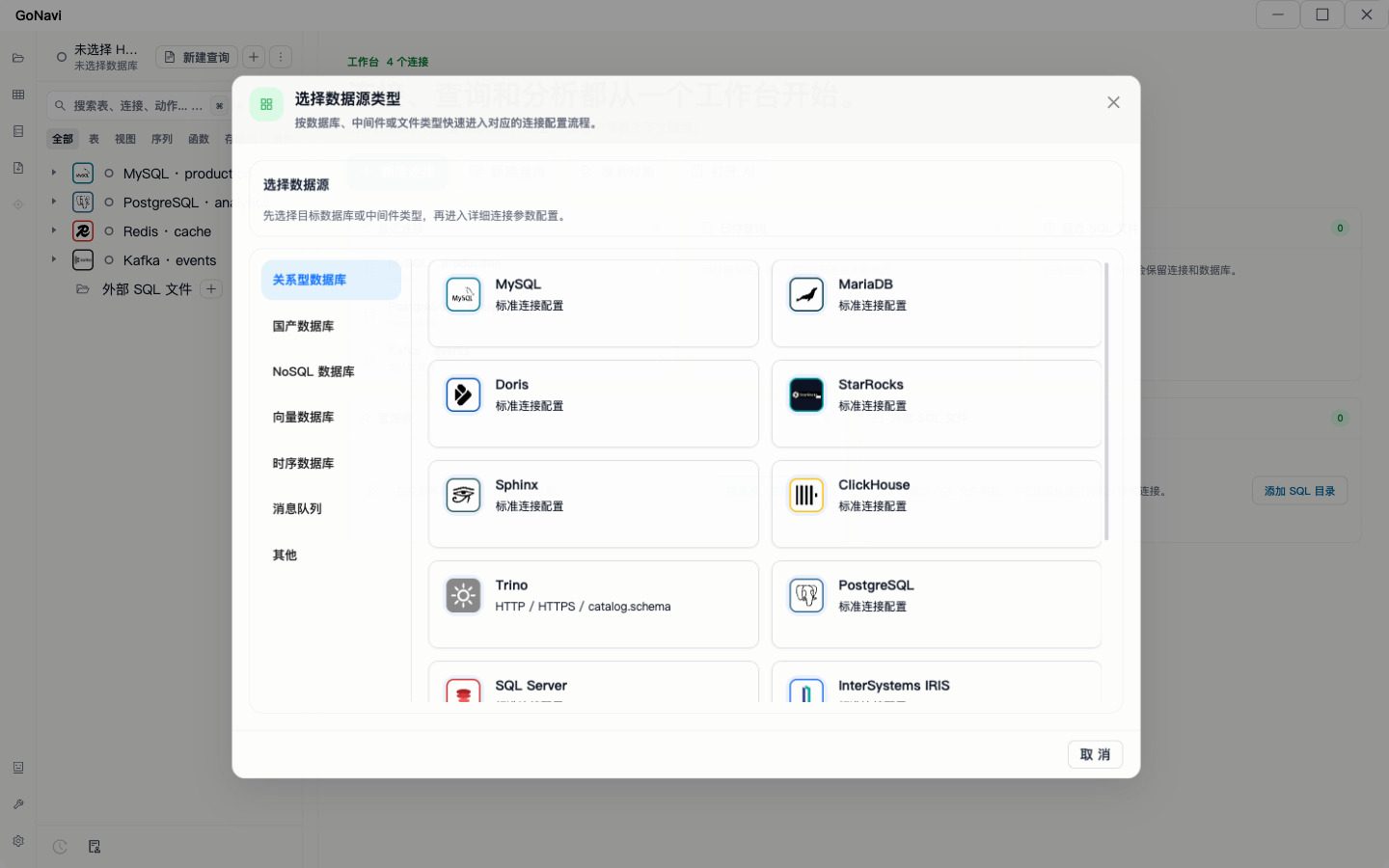
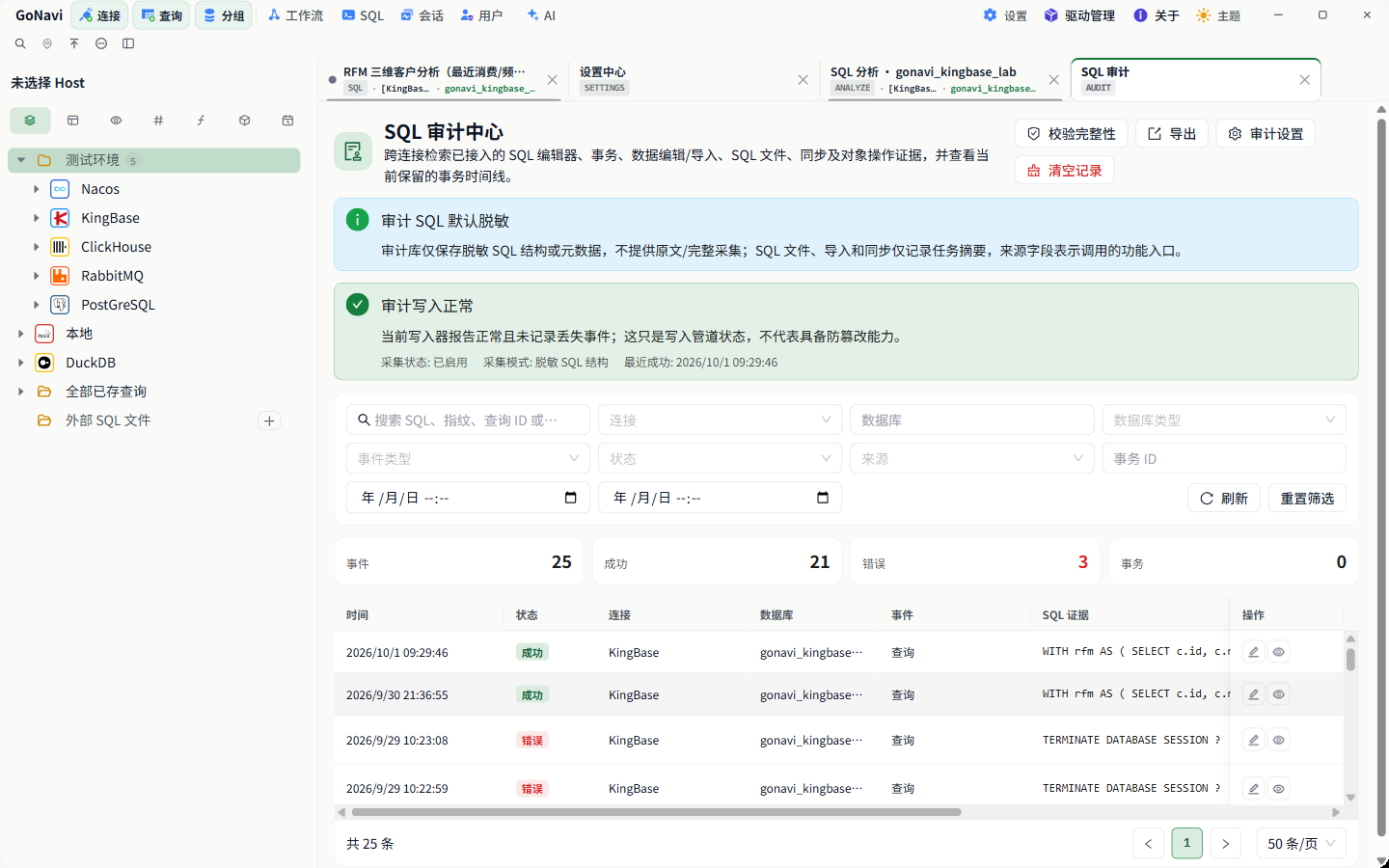
SQL editorWrite SQL, see the results, browse tables on the leftWorkbenchRecent connections and saved queriesAI assistantThe AI sees your table schemas; insert, run, or preview the SQL it writesNew connectionFind a data source by category, or search for itHistoryFilter past statements by status and time, then send one back to the editorSQL auditAudit records for every connection, redacted by defaultAI toolsThe built-in tools and inspection flows the AI can callThemes8 built-in themes, or upload your own CSS
Click the screenshot to enlarge
The data in these screenshots comes from a local test database. Connection addresses, keys, and AI provider settings are not shown.
Data sources
Works with 50+ data sources
Common ones like MySQL, PostgreSQL, Oracle, Redis, and Kafka are built in and work right after install. Drivers for the rest install from the Driver Manager when you need them.
Relational12
Chinese databases12
Analytics · Federated5
Time-series7
Search5
Vector4
Message queues4
NoSQL · Coordination5
Not in the list:
You can connect it yourself with Custom Driver + DSN, or tell us you need it on GitHub.
Size and memory
Installer size and memory use
Many database clients are built on Electron and ship installers of several hundred MB. GoNavi is built with Go and the system's own WebView. Here are measured numbers for v0.9.8, and how they were measured.
Measured on v0.9.8
- InstallerDownload size
- 20–26 MBEvery Windows, macOS, and Linux installer falls in this range.
- UI technologyWhat draws the window
- Go + system WebViewBuilt with Wails. No bundled Chromium.
- MemoryAfter launch
- ≈ 429 MBMain process on Linux with an empty workbench and no connections; about 765 MB including WebKit helper processes.
| Typical Electron client | GoNavi | |
|---|---|---|
| Runtime | Chromium + Node.js | Go + system WebView |
| Installer | Usually hundreds of MB | 20–26 MB |
| Startup | Slower | Faster |
| Memory figures | Often mixed up with installer size | Measured separately, method published |
| AI | None, or via plugins | Built-in AI assistant, MCP support |
| Data sources | Mostly relational | Also caches, message queues, vector, search, time-series, and Chinese databases |
Installer size and memory use are different things. The memory figures come from one run on a Linux cloud machine with the v0.9.8 WebKit41 build, an empty workbench, no database connections, and a remote display, read after 30–40 seconds. Expect different numbers on Windows and macOS. How it was measured
Features
Main features
Write SQL, edit data, export results, and look up what ran, all in one window.
The assistant can see the current database's table schemas. It writes SQL, explains statements, and suggests optimizations. You can preview generated SQL before running it.
- Works with OpenAI, Gemini, Claude, and any OpenAI-compatible API
- Sends the current table schemas along automatically
- Quick commands: generate SQL, explain, optimize, review a table design
- Database passwords stay on your machine and are never sent to the AI
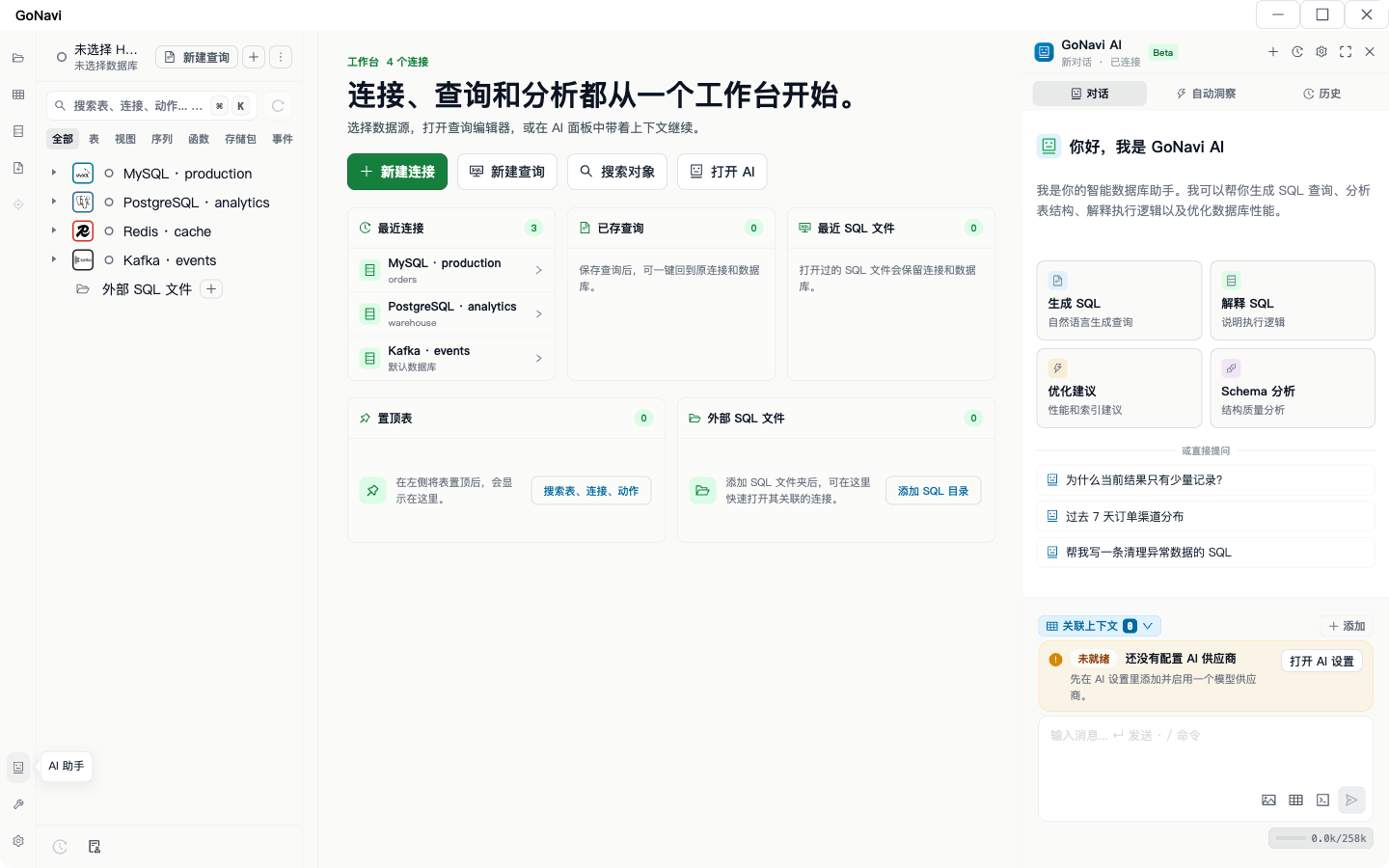
The grid uses virtual scrolling, so large result sets stay smooth. Edit cells in place and commit them together.
- Edit cells directly, including batch inserts, updates, and deletes
- Commit or roll back your changes as a transaction
- View and edit large fields in a popup
- Export to CSV, XLSX, JSON, or Markdown
- A Monaco-based SQL editor that completes database, table, and column names
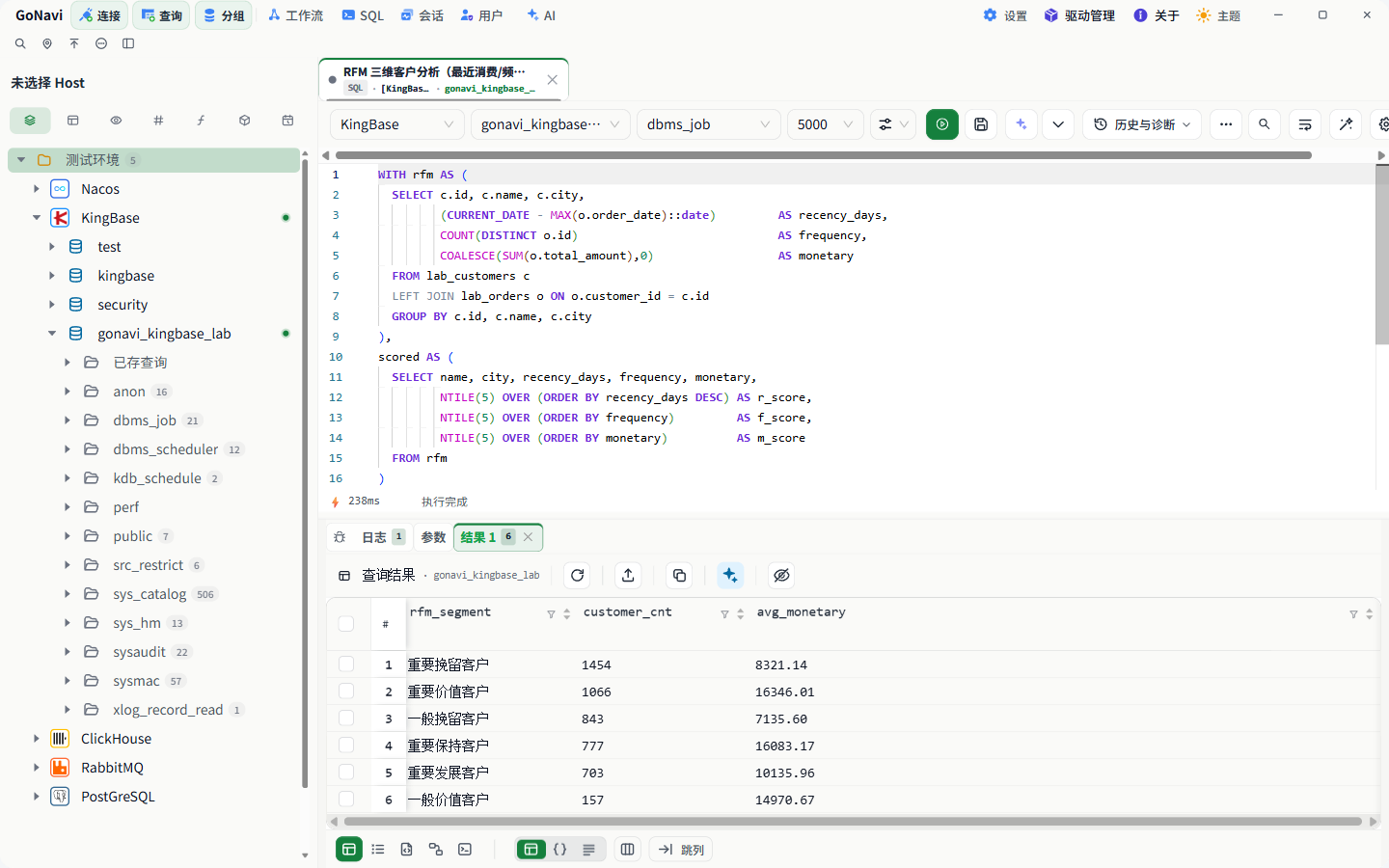
URIs, SSH tunnels, and proxies are supported. Export your connections as JSON to move them to another computer or share them with teammates.
- Paste a URI to fill in a connection, or generate one from it
- SSH tunnels and proxies
- Import and export connections as JSON
- Drivers for less common databases install only when you need them
- Connect anything else with a custom driver and DSN
Every statement you run is logged with how long it took. Audit records are redacted by default, can be kept for a set time, and can be exported.
- SQL execution log with timing
- Audit center: redacted by default, retention settings, export
- An experimental Web Server version that runs in the browser
- Deploy with Docker, Kubernetes, Helm, or Podman
- Automatic update checks; x64 and ARM64 builds
MCP
Agents can read your schemas
GoNavi includes an MCP server. Once connected, a coding agent such as Claude Code or Codex can look up table schemas and, if you allow it, run SQL. Database passwords stay on the computer running GoNavi, so the agent never sees them.
- If one of these CLIs is installed, GoNavi detects it and connects in one click. Remote agents connect over Streamable HTTP.
- Remote access is schema-only by default, without execute_sql. Turn it on and it follows the same safety settings as the built-in assistant.
- You can also run the MCP server on its own with Docker, Kubernetes, Helm, or Podman.
One-click setup for
- Claude Code
- Codex
- OpenCode
- ZCode
- DeepSeek Harness
- Kimi Code
- Grok Build
cp docker.mcp-server.env.example docker.mcp-server.env
docker compose --env-file docker.mcp-server.env \
  -f docker-compose.mcp-server.yml up -d
gonavi list-connections
gonavi query --conn CONNECTION_ID \
--sql 'SELECT * FROM orders LIMIT 10'
gonavi export --conn CONNECTION_ID \
--output orders.csv --sql 'SELECT * FROM orders'cp docker.web-server.env.example docker.web-server.env
docker compose --env-file docker.web-server.env \
-f docker-compose.web-server.yml up -dExample: the tools an agent calls to find tables and columns
- get_connections
- get_server_version
- get_databases
- get_tables
- get_columns
Download GoNavi
Free and open source under Apache-2.0, with installers for Windows, macOS, and Linux.