
Searching for a lightweight native database client? Most pages mix three different numbers into one slogan. This guide separates installer size, steady-state RSS, and UI stack — then shows how to score GoNavi, Electron clients, and JVM tools without comparing apples to oranges.
The “lightweight” trap
“Lightweight” is the most abused word in database-GUI marketing.
People usually mean one of three different pains:
- Download / IT friction — “Can I get this past a locked laptop and a 50 MB ticket limit?”
- RAM while idle — “Does this sit at 2 GB before I even open a connection?”
- Stack tax — “Am I shipping a whole Chromium (Electron) or a JVM just to edit SQL?”
Those are not interchangeable. Quoting a 25 MB installer next to someone else’s 80 MB “native RAM” claim — without methodology — is how comparison posts go wrong.
GoNavi’s product line (and the README Why GoNavi framing) is built to keep the three columns apart. This article is the longform version of that discipline.
Three numbers, one scorecard
| Number | What it answers | What it does not answer |
|---|---|---|
| Installer size | Download size, USB / SCCM friction, “how big is the asset on GitHub Releases?” | How much RAM the UI holds after launch |
| Steady-state RSS | Resident memory after idle (label OS, build, connections, display) | How small the .dmg / .msi is |
| UI stack | Electron vs system WebView vs JVM / Qt / pure native | A single “light / heavy” badge without context |
How to read a vendor claim
| Claim shape | Healthy? | Why |
|---|---|---|
| “Installer ~22 MB (Windows portable v0.9.8)” | Yes | Concrete asset + version |
| “Idle RSS ≈429 MB main on Linux WebKit41, empty workbench, method noted” | Yes | Labeled sample |
| “Native ~80 MB” with no OS, no process list, no idle vs load | No | Unverifiable slogan |
| “Lighter than Electron” while only showing installer MB | Incomplete | Stack claim needs stack evidence; RAM needs RSS |
What “native” actually means here
In 2026 database-client talk, native is overloaded:
- Native UI toolkit (AppKit / WinUI / Qt widgets) — pixel-native controls
- Native host process (Go / Rust / C++) wrapping a system WebView — not shipping Chromium
- “Feels native” marketing — often still Electron underneath
GoNavi’s path is the middle one: Wails = Go backend + system WebView (WebView2 on Windows, WebKit on macOS/Linux builds). That is not Electron. It is also not a claim that every control is AppKit-drawn. When you compare “native clients,” say which definition you used.
Scorecard: common client families
Use this as a decision table, not a beauty contest.
| Family | Typical UI stack | Installer class (order of magnitude) | RAM conversation | Pick when… |
|---|---|---|---|---|
| Electron SQL clients (e.g. Beekeeper-class) | Chromium + Node | Often hundreds of MB | Chromium baseline; do not confuse with download size | You want polished OSS SQL UX and accept Chromium tax |
| JVM / Eclipse lineage (e.g. DBeaver-class) | Java UI | Moderate installers; runtime is the story | Community often reports multi‑GB class RSS under real use | You need obscure JDBC drivers |
| Commercial “native feel” SQL (e.g. TablePlus-class) | Platform-native leaning | Varies; license walls matter more than MB | Usually fine for relational-only desks | Few RDBMS, love the UX, OK with paid unlocks |
| IDE SQL (e.g. DataGrip-class) | JetBrains platform | IDE-class | IDE-class | You already live in JetBrains |
| GoNavi | Go + system WebView (not Electron) | ~20–26 MB class (v0.9.8 Win / macOS / Linux assets) | Linux idle sample: main ≈429 MB; with WebKit helpers ≈765 MB (method below) | One multi-engine cockpit + honest three-number framing |
GoNavi numbers (labeled, v0.9.8)
| Metric | Value | Method / caveat |
|---|---|---|
| Windows portable | ≈ 20.5 MB | GitHub Release asset |
| Windows MSI | ≈ 22.7 MB | GitHub Release asset |
| macOS Arm64 DMG | ≈ 26.1 MB | GitHub Release asset |
| Linux package | ≈ 21 MB | GitHub Release asset |
| Linux idle RSS (main) | ≈ 429 MB | WebKit41 build, empty workbench, no DB connections, remote display, ~30–40 s steady |
| Linux idle RSS (+ WebKit helpers) | ≈ 765 MB | Same run; helpers counted |
| UI stack | Go + system WebView | Not Electron; Windows still needs WebView2 runtime on the machine |
Installer MB ≠ RAM. Do not put 20 MB next to 429 MB as if one “wins.” Do not compare either to an unverified “native ~80 MB” marketing line. Windows / macOS laptop RSS may differ — treat the Linux figures as a labeled sample, not a leaderboard score.
Why locked laptops care about installers first
Community complaints (LibreDB-style threads, Reddit / HN adjacent) keep circling the same constraint: dbeaver + compass + redis gui + ssh… none of that fits on a locked work laptop.
On those desks, the first gate is often:
- Can I download a ~20 MB asset without a change ticket fight?
- Do I need five installers for SQL + Redis + Kafka + vector + search?
- Does the client ship Electron (another Chromium) or reuse system WebView?
Installer size and multi-engine reach matter before anyone opens Activity Monitor. RSS still matters — just later, and with a method note.
Electron tax vs WebView: what you are actually buying
| Typical Electron client | GoNavi (Wails) | |
|---|---|---|
| Runtime | Chromium + Node | Go + native / system WebView |
| Installer | Hundreds of MB common | ~20–26 MB class |
| “Lightweight” slogan risk | High if only download is quoted | Lower if three numbers stay separate |
| Memory claim hygiene | Must measure RSS separately | Same rule — we publish a Linux sample |
Neither stack makes AI safe by itself. Stack only answers how the UI is packaged. Production safety still needs human gates (see the AI article in this series).
How to measure RSS yourself (copy this method)
When a vendor says “light,” ask them — or measure:
- Note version, OS, CPU arch, and which binary (e.g. WebKit41).
- Launch to an empty workbench; connect zero databases.
- Wait 30–60 s after UI is idle.
- Record main process RSS and, if relevant, helper / WebKit / GPU processes.
- Publish the sum and the parts — never only the flattering number.
- Re-run with one live connection if you want a “day-two” figure; label it separately.
That is the bar GoNavi’s README sample tries to clear. Hold competitors to the same bar.
When a “lightweight native” client is the wrong buy
Skip the lightweight pitch (including GoNavi’s) if you:
- Need a niche JDBC driver only a JVM tool ships today
- Want a pure terminal workflow (
psql+ editor) and never open a grid - Require a cloud-only SaaS SQL IDE with zero desktop install
- Only use one commercial RDBMS and already love a paid native SQL UI
Honesty here converts better than stacking every MB claim on one slide.
Multi-engine reach still counts as “light”
Lightweight is not only process math. On a locked laptop, five companion GUIs are heavier than one 25 MB installer — even if each companion looks “small” alone.
A practical day-one set people try to collapse:
- Relational SQL client
- Redis / cache browser
- Document or vector UI
- Kafka / MQ console
- SSH / tunnel habits that never lived inside the SQL app
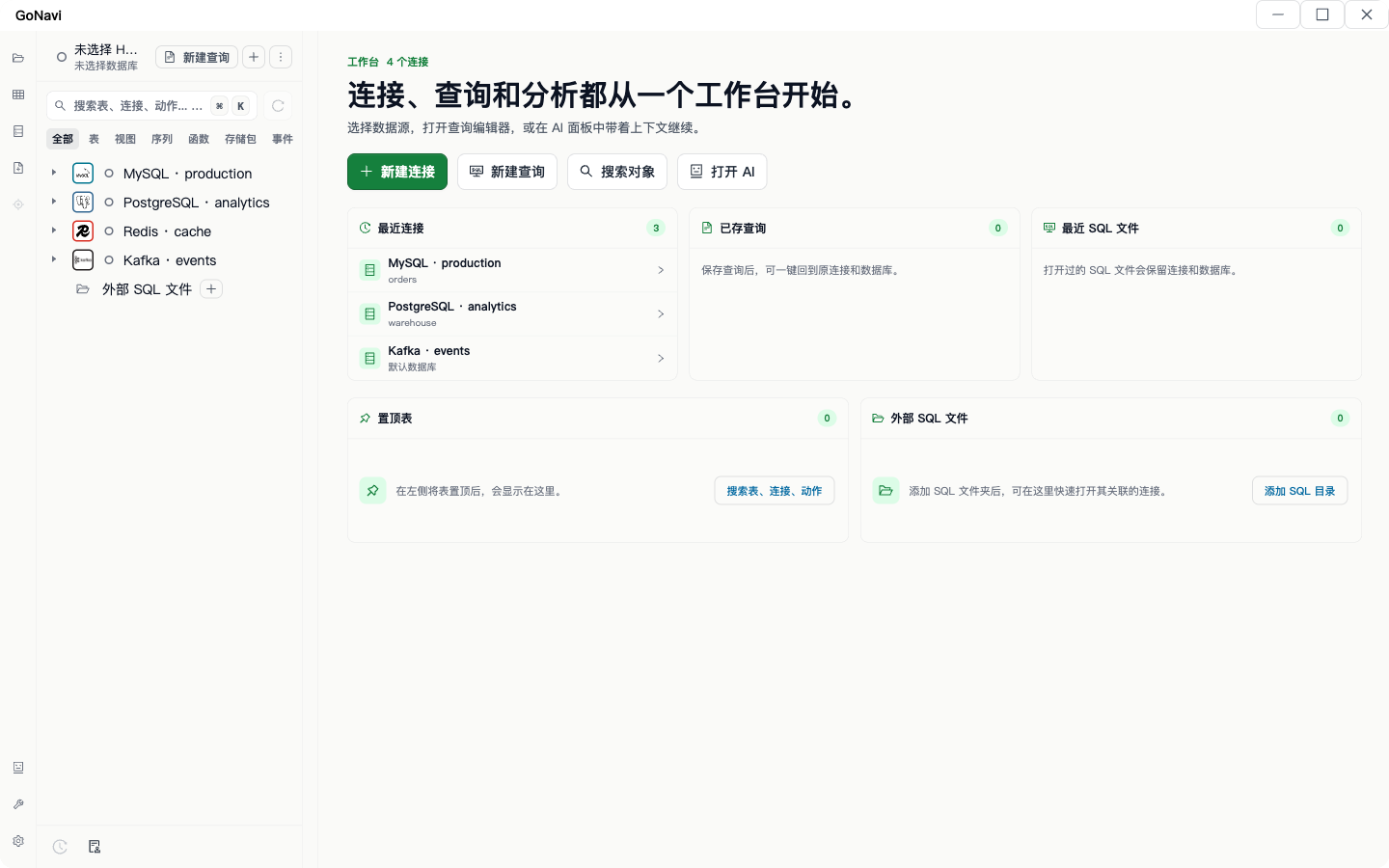
GoNavi’s workbench pitch is: keep SQL · cache · vector · MQ · search · time-series · domestic engines in one sidebar, so “lightweight” includes fewer installs, not only a smaller Chromium tax. You still will not replace every specialist tool on day one; you cut the tray that made LibreDB-style complaints go viral.
Screens:
- Multi-DB workbench
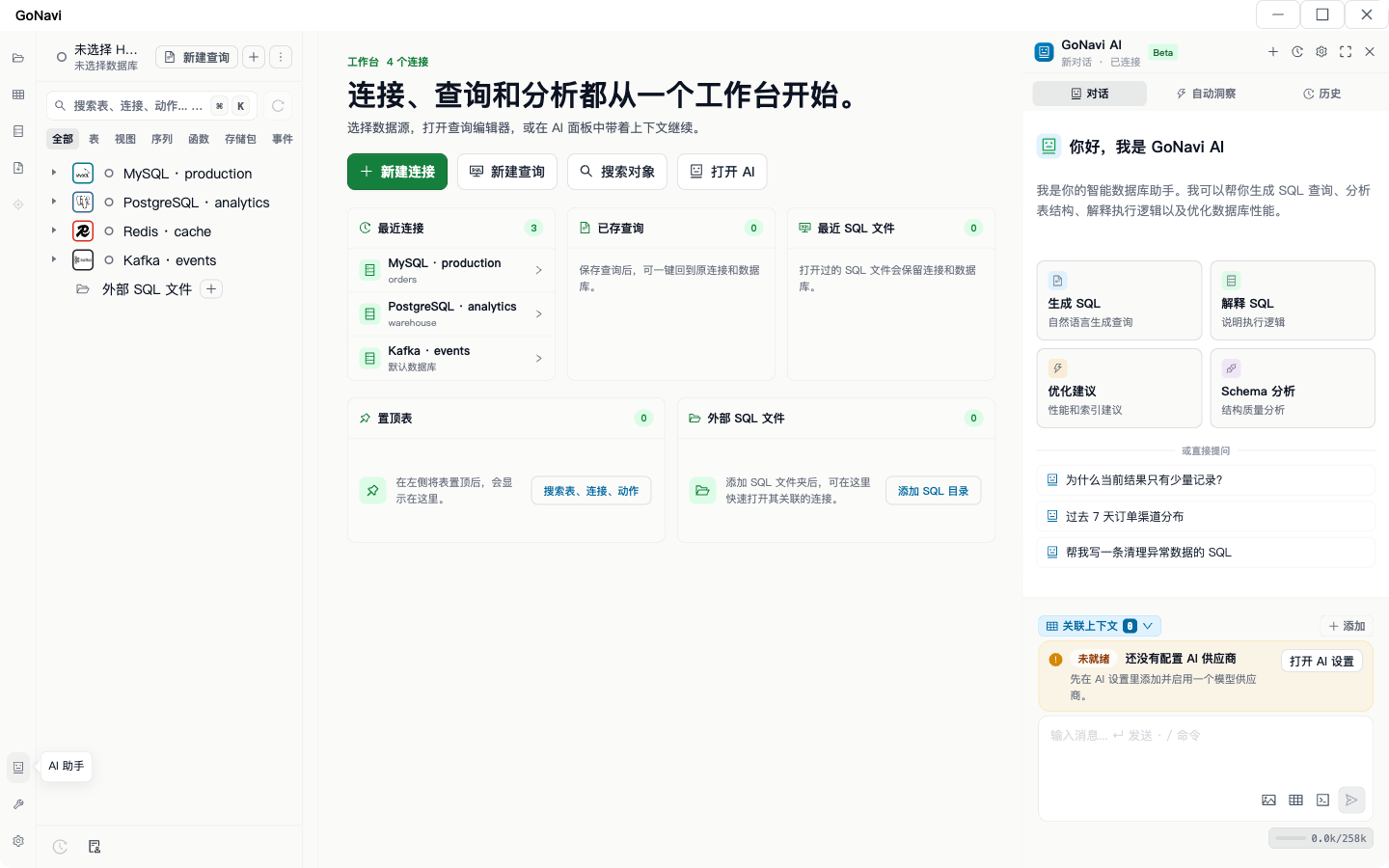
- AI panel (UI evidence; configure your own provider)
What to put in your next comparison blog post
If you write “GoNavi vs X” for SEO, use this skeleton so you do not recreate the trap:
- State the three columns up front (installer / RSS / stack).
- Cite versions for every MB number.
- One method paragraph for any RSS figure (OS, idle vs load, helpers counted or not).
- Separate “multi-engine cockpit” from “RAM winner.”
- Never invent Search Console traffic or unverified “~80 MB native” as a GoNavi claim.
- Link readers to measure on their Windows / macOS box — cloud Linux samples travel poorly without a caveat.
That skeleton is how this page tries to rank: decision clarity, not slogan density.
FAQ
Is a 20 MB installer “lighter” than a 400 MB RSS?
Different columns. Small installers win IT gates; RSS wins RAM debates. Compare like with like.
Is GoNavi fully “native UI”?
It is Go + system WebView, not Electron, and not a claim of 100% toolkit-native widgets. Say the stack out loud.
Why publish hundreds of MB RSS at all?
Because hiding it would recreate the marketing mess this article argues against. A labeled sample beats a silent boast.
Where do the numbers come from?
Installer sizes: GoNavi v0.9.8 GitHub Release assets. RSS: one Linux cloud run described above. No invented Search Console or leaderboard rankings.
Bottom line
A lightweight native database client search should force three columns: installer, RSS, UI stack. GoNavi’s honest pitch is small ~20–26 MB installers, non-Electron WebView packaging, and a labeled Linux RSS sample — plus one multi-engine workbench so you install fewer companion GUIs on a locked laptop.
Download from Releases, measure on your OS, and keep the columns separate when you write the next comparison post.
Related: Best TablePlus Alternatives in 2026 · After AI Can Write SQL, Do You Still Need a Database GUI?
Source notes: aligned with GoNavi README “Why GoNavi?” three-number framing (PR #1230); product facts from v0.9.8 releases — not Search Console metrics.