
Primary intent: AI SQL is real — models draft
SELECT, joins, and even migration sketches in seconds. The question that follows is not “is ChatGPT good at SQL?” It is: do you still need a database GUI (or any serious client) once AI can write the statement? Short answer: yes, if anything you run can break production. AI drafts; the GUI owns connections, schema, results, EXPLAIN, and the production gate.
The wrong debate
Hacker News and Reddit keep circling a tidy binary: management tools vs models that write SQL. That framing sells engagement. It does not ship safely.
What people actually do in 2026 looks more like this:
- Paste a vague intent into a chat (“top customers who churned after failed payments”).
- Get a confident SQL draft.
- Wonder whether the draft matches this schema, this timezone, this soft-delete convention.
- Either paste into a client, a CLI, or — worst case — hit “run” in an agent with live credentials.
Step 4 is where the product question lives. Writing SQL is not the hard part of database work. Owning context, validating plans, reading grids, and deciding “safe to run” still are.
This article argues for a validation culture: only believe what you can validate. AI is efficient at drafting and still dumb if unmonitored. The GUI (or client / workbench) is the place that culture lives — not because GUIs are pretty, but because they hold the human gates.
What AI is actually good at
Give a modern model enough schema hints and it will often:
- Draft a readable
SELECTwith reasonable joins - Sketch ETL / report SQL from English
- Suggest indexes or rewrite a slow query in text
- Explain what a statement might do in plain language
- Generate fixture data or migration outlines for review
That is valuable. It is also incomplete. Models do not magically know:
- Which of your five Postgres connections is staging vs prod
- Whether
deleted_at IS NULLis the house rule on this table - That Redis key patterns and Kafka topics live next to the SQL work
- Whether the plan will sequential-scan a 200 M row table on Friday night
- That “drop and recreate” sounded fine in chat and is catastrophic on the shared cluster
So treat AI as a copilot that drafts, not as an unsupervised driver.
Decision table: Job | AI | GUI / client
Use this as a decision table, not a feature bingo card. The point is division of labor — not “AI replaces GUI.”
| Job | AI | GUI / client |
|---|---|---|
Draft SELECT / report sketch |
Strong | Optional (paste & review) |
| Draft DDL / migration outline | Helpful (review hard) | Client shows schema / diffs |
| Attach live schema context | Helpful if you feed it | Client supplies catalogs, types, constraints |
| Multi-connection cockpit (SQL · cache · MQ · vector) | Weak | Required |
| Browse / edit rows, batch transactions | Weak | Required |
| Result grid, export, visual diff | Weak | Required |
EXPLAIN / plan review |
Assist (text) | Human gate in the client |
| Decide “safe to run in prod” | No | Human gate |
| Hold credentials & tunnels | Risky if cloud-only chat | Host-side secrets / SSH / SSL |
| Read-only vs write agent policy | Model cannot enforce | Product / ops policy |
If your workflow is “chat owns production,” you do not have a client problem — you have a process problem. Swapping TablePlus for another skin will not fix it.
Product norms for safe text-to-SQL
Whether you use GoNavi, another GUI, or a custom agent, the norms that keep text-to-SQL from becoming an incident look the same:
- Show the SQL — never hide the statement behind a “smart run” button. The human must see what will execute.
- No auto-run of destructive statements —
DROP,TRUNCATE, broadDELETE/UPDATEwithout aWHEREyou understood, and blind migrations stay behind an explicit confirm (or stay blocked). - Prefer read-only agents for exploration — default the copilot / MCP tools to SELECT-class access; escalate write scope deliberately.
- EXPLAIN before trust — especially on large tables and anything that smells like a full scan. AI “optimize” suggestions are hypotheses until the plan says otherwise.
- Separate draft from execute — generate in a panel; run in a query tab you control; keep staging and prod visually distinct.
- Log what ran — who, which connection, which statement. Chat history is not an audit trail for production.
These norms are why a database GUI still matters after AI can write SQL. The client is where show-SQL, confirm, EXPLAIN, connection identity, and result review cohabit. A naked chat box optimizes for fluency, not gates.
Why “ChatGPT + psql” is not the same product
CLI plus chat works for:
- One-off investigations on a single engine
- Engineers who already live in
psql/mysql/redis-cli - Throwaway sandboxes where a bad statement costs nothing
It fails the desks that drove people into GUI searches in the first place:
- Locked laptops that cannot host five companion tools
- Multi-engine days — MySQL + Redis + Kafka + a vector store before lunch
- Visual grids for spot-checking encoding, nulls, and “wait, why 0 rows?”
- EXPLAIN habit with a UI that keeps plan + SQL + connection in one place
- SSH / SSL / tunnel settings that should not be re-typed into every chat session
AI does not erase those needs. It amplifies the cost of getting them wrong — because fluent wrong SQL ships faster than awkward wrong SQL.
GoNavi’s line: AI copilot in the workbench
GoNavi’s product stance matches the decision table above:
- AI is a copilot inside the workbench — generate / explain / optimize entry points sit next to real connections, not instead of them.
- You still own schema browsing, query tabs, result grids, and when something runs.
- MCP / agents: tools can be exposed without shipping passwords off-host — secrets stay on the host.
- Stack context (for readers comparing clients): Wails (Go + system WebView), multi-source sidebar — evaluate AI safety on gates, not on whether the UI is Electron.
Screens (UI evidence only; configure your own provider — these shots do not claim a live model is wired in the screenshot environment):
- AI assistant panel — generate / explain / optimize entry points
- Home workbench — multi-engine cockpit where drafts become reviewed runs
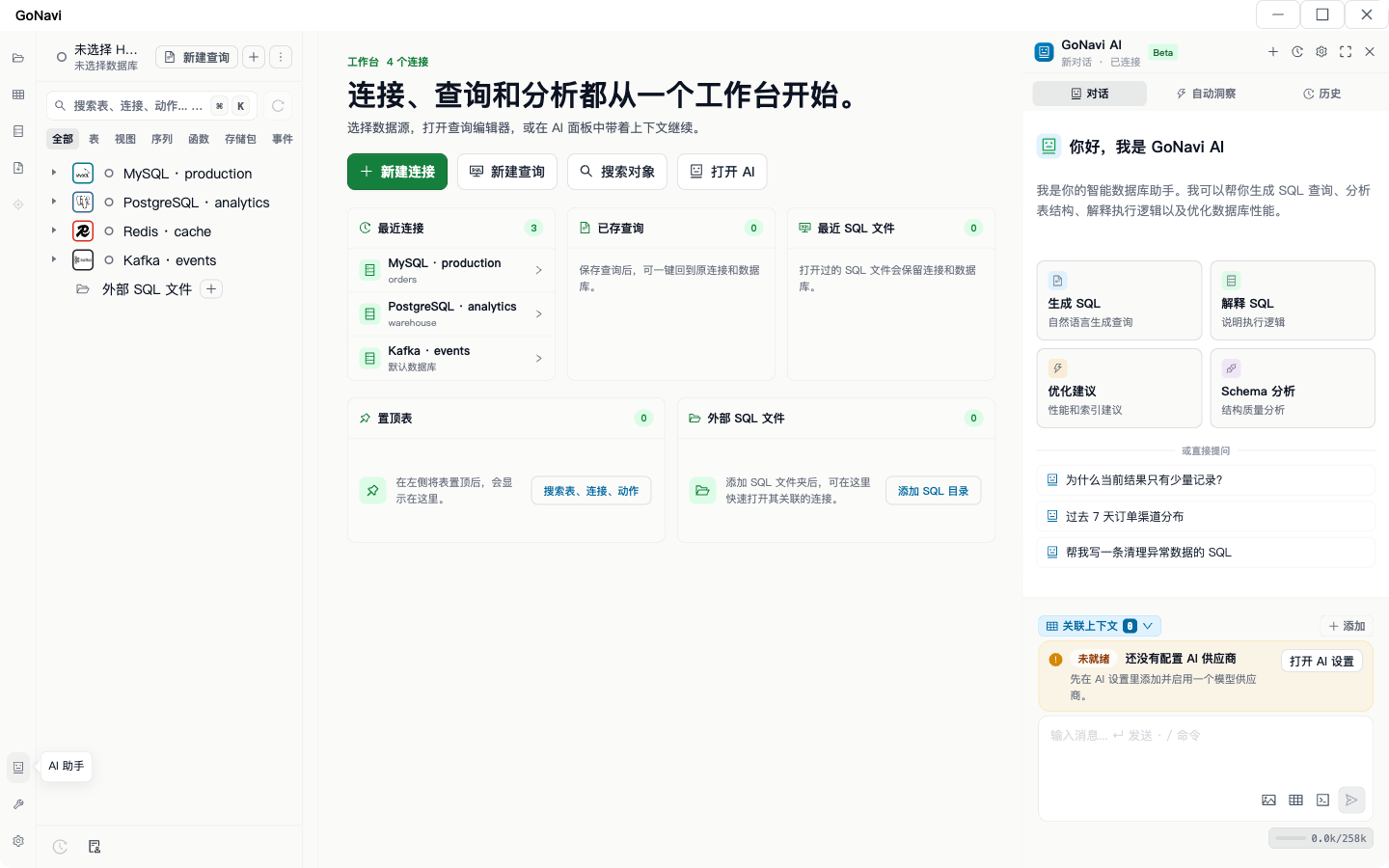
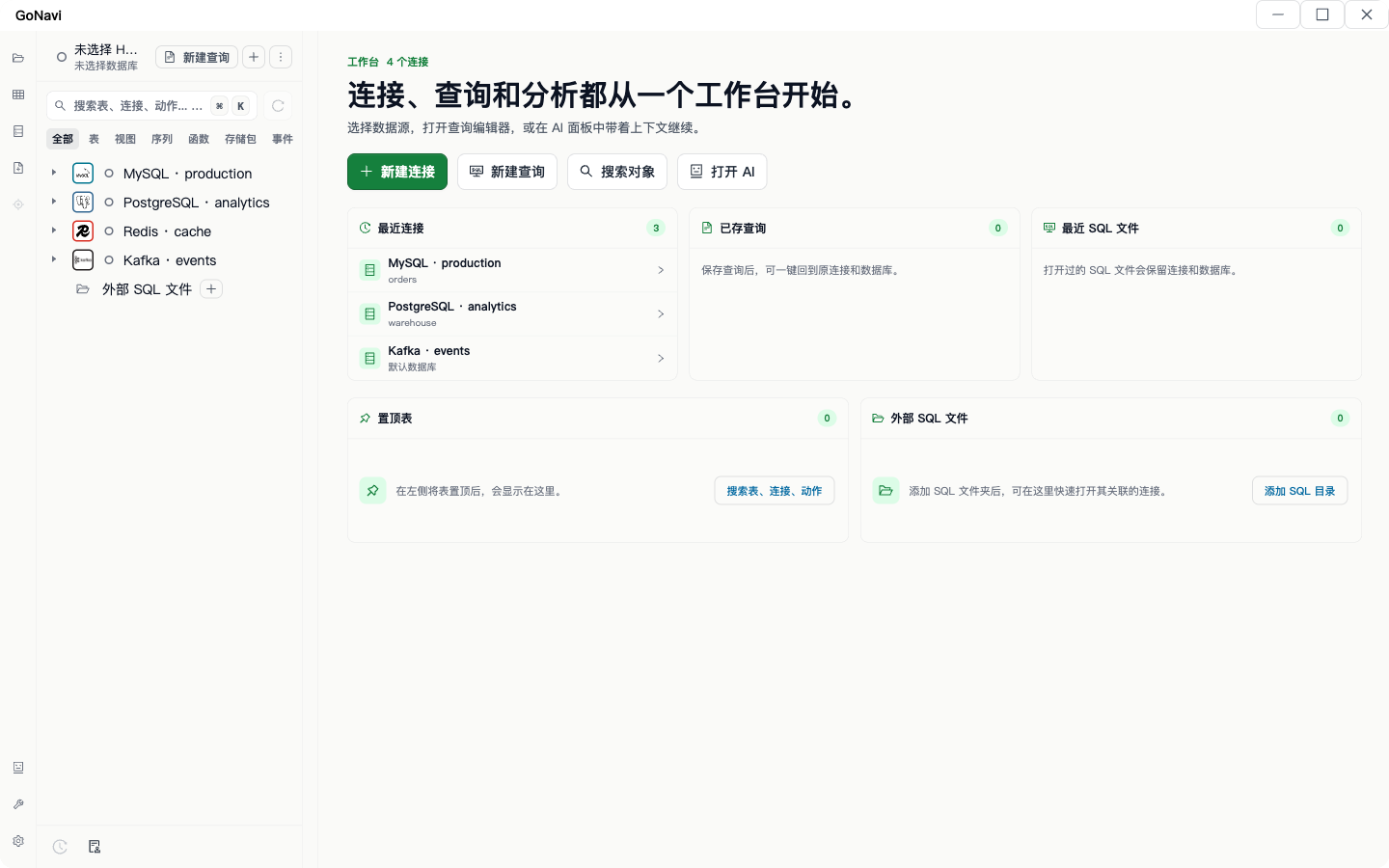
If a vendor demo shows “natural language → rows” with no visible SQL, treat that as a red flag, not a feature win.
Validation culture (how teams actually stay safe)
Borrow the community framing that keeps showing up next to AI-SQL threads:
- Only believe what you can validate — row counts, EXPLAIN, known-good fixtures, staging first.
- Efficient but dumb if not monitored — speed without a gate is how fluent mistakes become outages.
- Human in the loop is not optional theater — it is the product. The GUI makes the loop cheap: see SQL → run EXPLAIN → run on staging → promote.
A practical desk checklist:
- Ask AI for a draft with explicit schema pasted or attached from the client.
- Read the statement; rewrite aliases / filters you do not trust.
- Run
EXPLAIN(orEXPLAIN ANALYZEon a safe replica / staging) before prod. - Execute on staging with production-like data shape when the change is write-shaped.
- Only then run on prod — still with the statement visible, still with a connection you chose on purpose.
None of those steps require distrusting AI. They require not outsourcing judgment.
When you might not need a full GUI
Honesty converts better than “everyone needs our app.”
You may be fine without a heavy database GUI if you:
- Live in one engine and already have a disciplined
psql+ editor + review ritual - Only ever touch ephemeral personal sandboxes
- Use an IDE SQL console you already trust (and still show SQL + EXPLAIN)
- Are prototyping schemas that never touch shared data
Even then, the norms above still apply. The GUI is one embodiment of the gate — not the only possible one.
Not for you if…
Skip GoNavi (and be skeptical of any “AI database” pitch) if you:
- Want a model with production credentials and no human gate
- Need a fully cloud-only SaaS SQL IDE with zero desktop install and are unwilling to keep secrets on a host
- Require a niche JDBC driver only a JVM tool ships today
- Prefer a pure terminal workflow and will never open a result grid
- Only use one commercial RDBMS and already love a paid native SQL UI’s license model — and your AI use is already gated there
Also skip any tool — including ours — that markets AI SQL as “replace your DBA / replace your client” without show-SQL, destructive confirmations, and EXPLAIN discipline.
How this fits the GoNavi docs series
This is article ③ in the SEO / decision series:
- Best TablePlus Alternatives in 2026 — free-tier walls, multi-DB cockpit, when to switch
- Lightweight Native Database Client in 2026 — installer MB ≠ RSS ≠ UI stack
- This page — after AI can write SQL, do you still need a GUI?
Together they answer three different intents without inventing Search Console rankings or unverified RAM slogans. Score tools on your connections, your gates, and your measurements.
FAQ
Does AI replace database GUIs in 2026?
No. AI replaces blank-page friction. GUIs / clients still own connections, schema context, results, EXPLAIN, and production gates.
Is “show the SQL” enough?
Necessary, not sufficient. Pair it with no auto-run destructive, read-only defaults for agents, and EXPLAIN before trust.
Where do MCP secrets belong?
On the host. Expose tools; do not ship production passwords into a chat provider’s context by default.
Will this page quote traffic or “~80 MB native” memory wins?
No. Invented Search Console metrics and unverified RAM slogans help nobody. See the lightweight article for labeled installer / RSS / stack discipline.
Why not only ChatGPT + CLI?
Fine for one-off single-engine work. Weak for multi-engine desks, visual validation, and locked laptops that already hate a tray of companion GUIs.
Bottom line
After AI can write SQL, you still need a database GUI (or an equally serious client) whenever a statement can hurt shared data. Let AI draft. Let the workbench own connections, schema, grids, EXPLAIN, and the prod gate. Prefer products that show SQL, refuse silent destructive runs, default agents toward read-only, and keep secrets on the host.
GoNavi’s line is that split: AI copilot in the workbench, not AI instead of the workbench. Start from the AI panel and workbench shots, download from Releases, and decide with your own validation culture — not a marketing autopilot story.
Related: Best TablePlus Alternatives in 2026 · Lightweight Native Database Client in 2026
Source notes: product stance from GoNavi README / workbench + AI / MCP framing; community “validation culture” themes synthesized for decision-making — not Search Console metrics; no unverified “~80 MB native” claims.